

 SkillClick
RIITEK USB 3.0 to HDMI Video Converter: A Simple Way to Add an HDMI Display
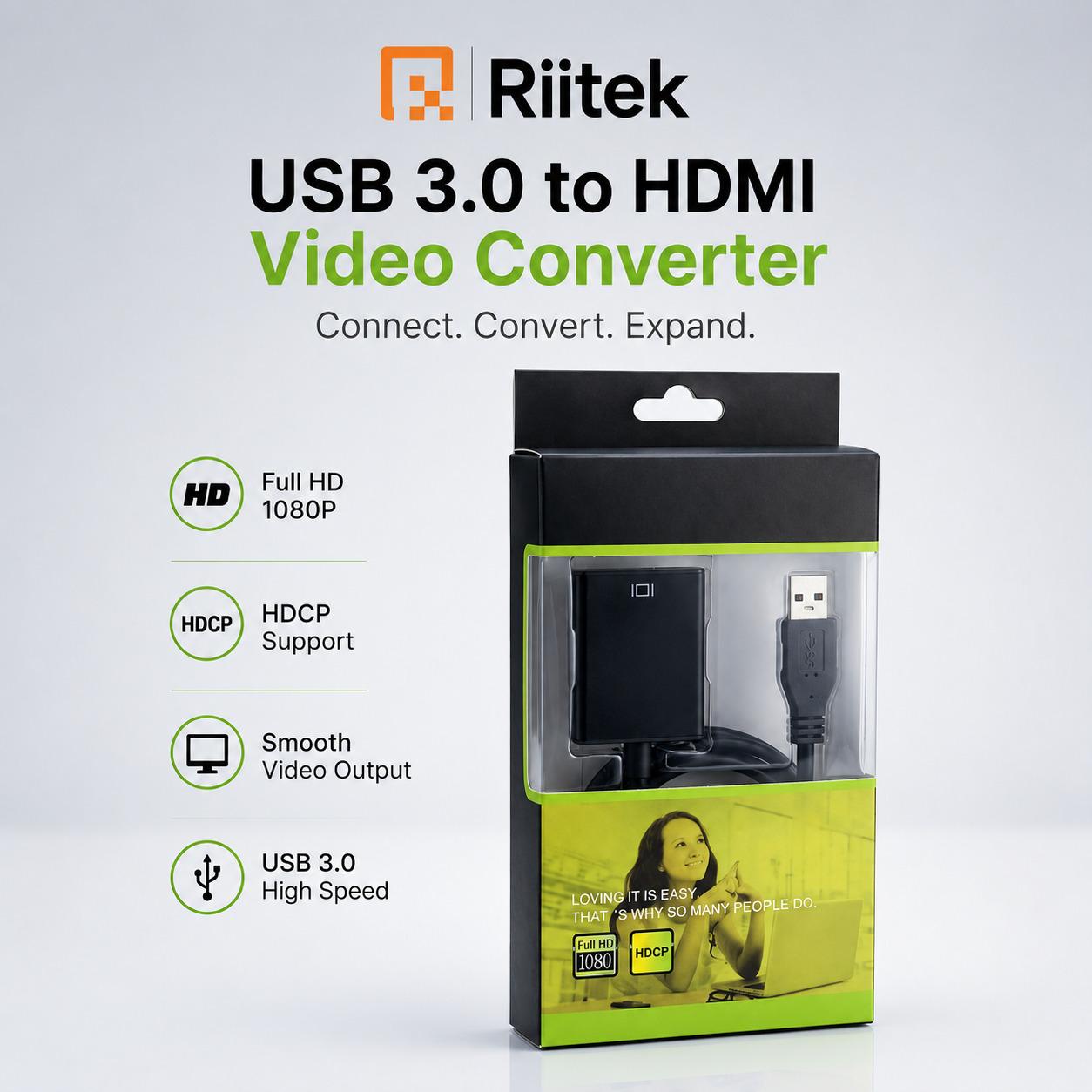
Modern work often requires more screen space. Whether you are preparing presentations, working with multiple applications, watching videos, or setting up an extended desktop, an additional monitor can make multitasking more convenient.
The RIITEK USB 3.0 to HDMI Video Converter provides a practical way to connect a computer or laptop with a USB port to an HDMI-enabled monitor, HDTV, or projector. It is designed to transmit high-definition video and audio through an HDMI connection, making it useful for both home and office environments.
What Is a USB 3.0 to HDMI Video Converter?
A USB 3.0 to HDMI video converter is an adapter that allows a compatible computer to send display output through a USB port to an HDMI display.
The RIITEK converter connects a computer or laptop to an HDMI-equipped monitor, television, or projector. This can be useful when the computer does not have enough native HDMI display outputs for the desired setup.
Full HD 1080p Display Support
The RIITEK USB 3.0 to HDMI Video Converter supports resolutions of up to 1920 × 1080 Full HD when used with a USB 3.0 connection and a compatible Full HD display.
This makes it suitable for everyday applications where clear visuals are important, including presentations, office work, web browsing, video playback, and extended desktop setups.
When using USB 2.0 or a display that does not support Full HD, the available resolution can be limited. Users should check their computer and display specifications before installation.
Transmit Both Video and Audio
Another useful feature is the ability to transfer high-definition video and audio through the HDMI connection.
Instead of requiring separate connections for video and audio to the external HDMI display, the adapter can send both signals through the HDMI connection when supported by the connected equipment.
Create an Extended Display Setup
Adding an external screen can make multitasking easier. Users can keep their primary work on the laptop screen while using the connected HDMI display for additional applications.
For example, a professional could keep a document or spreadsheet on one screen and email or reference information on another. Students can use an additional display for research, while presentations can be shown on a larger screen.
Useful for Presentations
Presentations are another practical application for a USB to HDMI adapter.
A laptop can be connected to a compatible projector or larger HDMI display, allowing presentation content to be displayed on a bigger screen. This can be useful in meeting rooms, classrooms, training environments, and home setups.
Suitable for Office and Home Use
The RIITEK USB 3.0 to HDMI Video Converter is designed for a range of everyday environments.
Office users can use it for additional display setups and presentations, while home users can connect compatible computers to larger HDMI displays for entertainment, browsing, or productivity.
Its compact adapter format also makes it convenient to keep with a laptop or computer accessory kit.
Easy Driver Installation
The adapter includes a built-in driver stored inside the device. According to RIITEK's installation instructions, users can connect the adapter to their computer, open the device through "My Computer," locate the built-in driver, install it, and restart the computer.
Users should follow the supplied instructions and ensure their security software settings are appropriate during installation.
Designed for Windows Compatibility
The RIITEK USB 3.0 to HDMI Video Converter is designed to work with multiple Windows operating systems.
Before purchasing, users should verify that their particular computer, operating system, USB port, and HDMI display meet the product's compatibility requirements.
Benefits of Using a USB to HDMI Adapter
A USB to HDMI converter can be useful when you want to expand your display options without replacing your existing computer.
Some common benefits include:
- Connect a computer to an HDMI monitor
- Connect a laptop to an HDMI television
- Use a compatible projector with a computer
- Create an additional display
- Support Full HD 1080p through USB 3.0
- Transmit compatible video and audio
- Reduce the need for complex display hardware
- Convenient solution for home and office setups
- Ideal for Multitasking
- For people who regularly work with several applications, an additional display can provide valuable screen space.
- A second display can be used for email, research, communication applications, documents, dashboards, or reference material while the primary laptop display remains dedicated to the main task.
- This type of setup can be particularly helpful for professionals, students, freelancers, and home-office users.
- Compact Accessory for Your Computer Setup
- The RIITEK USB 3.0 to HDMI Video Converter is a small accessory that can add flexibility to a compatible computer setup.
- Instead of purchasing a new computer simply to obtain additional HDMI connectivity, users can consider an appropriate USB display adapter when their system meets the required compatibility specifications.
- Key Features at a Glance
- USB 3.0 to HDMI video conversion
- Supports up to 1920 × 1080 Full HD through USB 3.0
- Video and audio transmission through HDMI
- Compatible with multiple Windows operating systems
- Built-in driver for installation
- Suitable for monitors, HDTVs, and projectors
- Useful for presentations and extended displays
- Designed for home and office applications
- 7-day refund policy
- 1-year warranty
Who Should Consider a USB 3.0 to HDMI Converter?
This type of adapter can be useful for:
- Office professionals
- Remote workers
- Students
- Teachers
- Presenters
- Freelancers
- Home-office users
- Content viewers
- Users building multi-display workstations
Conclusion
The RIITEK USB 3.0 to HDMI Video Converter offers a convenient way to connect a compatible computer or laptop to an HDMI monitor, HDTV, or projector. With Full HD 1080p support through USB 3.0, HDMI video and audio transmission, and built-in driver installation, it can be a practical accessory for expanding display connectivity.
Whether you need an external screen for multitasking, a larger display for presentations, or an HDMI connection for a compatible home setup, a USB 3.0 to HDMI adapter can provide a simple and flexible solution.
Explore the RIITEK USB 3.0 to HDMI Video Converter for your compatible computer and display setup.
- Managerial Effectiveness!
- Future and Predictions
- Motivatinal / Inspiring
- Fitness and Wellness
- Medical & Health
- Manufacturing
- Education
- Real-Estate
- Food Industry
- Hospitality
- Online Games
- Sports
- Home Services
- Civil Engineering
- Safety and Protection
- Software Products & Services
- Fashion and Jewellery
- Artificial Intelligence
- Entrepreneurship
- Mentoring & Guidance
- Marketing
- Networking
- HR & Recruiting
- Literature
- Shopping
- Career Management & Advancement