

 SkillClick
Understanding the Practical Role of a VPN Connection
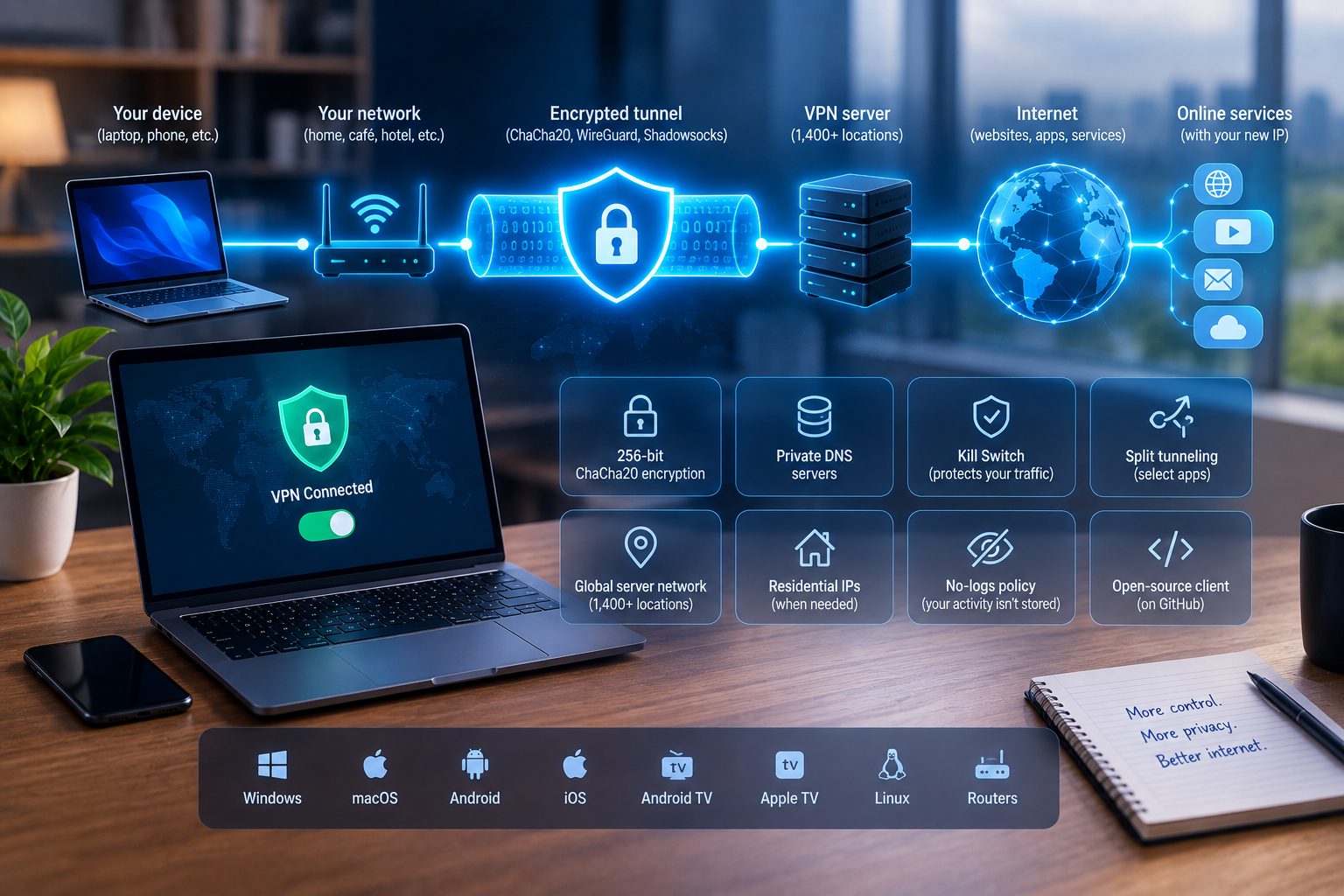
A VPN changes the path internet traffic takes between a device and online services. Instead of exposing the ordinary public IP address throughout the connection, traffic is routed through a remote VPN server and protected inside an encrypted tunnel. That basic mechanism can be useful across several situations, from connecting through unfamiliar Wi-Fi to managing network traffic on multiple devices. The important point is to understand the individual functions involved rather than treating a VPN as a universal security tool.
Privacy Starts With the Network Route
Without a VPN, internet traffic normally travels through the connection supplied by an internet provider or local network. Activating a VPN introduces an encrypted route between the device and the selected server. Online destinations then receive the server's public IP address instead of the one ordinarily associated with the user's connection.
For readers comparing how these functions are combined in one service, https://toggle.org/ provides information about encrypted connections, private DNS, server selection, and related privacy controls. These elements address different parts of network activity and are more useful when considered separately.
The encryption used for traffic is ChaCha20, while the available protocol stack includes WireGuard and Shadowsocks. Protocol choice concerns how the VPN connection operates; encryption concerns how information traveling through that connection is protected.
Split Tunneling Changes Which Apps Use the VPN
Routing every application through the same VPN connection is not always necessary. Split Tunneling allows selected applications to use the VPN while others continue through their regular internet route.
This distinction can matter on a device running several network-dependent programs at once. A browser, messaging application, cloud service, and other software do not necessarily need identical routing.
Split Tunneling should not be confused with changing server locations. Server selection determines where VPN-routed traffic passes through, while Split Tunneling determines which applications are included in that route.
Connection Failure Requires a Different Control
A VPN can disconnect while the device itself remains connected to the internet. In that situation, ordinary traffic could resume through the underlying network unless another control intervenes.
A Kill Switch is designed for this scenario. Its role is to prevent normal internet access when the VPN connection unexpectedly stops, rather than silently allowing traffic to continue outside the encrypted route.
An Ad Blocker is another built-in feature, but it serves a separate purpose by addressing advertising and tracking during browsing. Keeping these functions distinct makes it easier to understand what each setting contributes.
One Account Can Cover Different Types of Hardware
VPN use is no longer limited to desktop computers. Native applications are available for Windows, macOS, Android, iOS, Android TV, and Apple TV, allowing the same type of network connection to be used across computers, mobile devices, and televisions.
One account supports up to 10 simultaneous devices. Family Sharing can also extend a Premium subscription to as many as five additional people.
These figures describe account access rather than bandwidth. A device limit determines how many connections can be active at the same time, while traffic volume is a separate matter. The service states that VPN bandwidth is unlimited.
Server Selection Adds a Geographic Variable
A remote server is the point through which VPN traffic exits toward the wider internet. The available network contains more than 1,400 servers distributed across multiple regions, including the USA, Canada, France, Germany, the United Kingdom, Australia, Singapore, Switzerland, Austria, and the Netherlands.
Different server locations provide alternative network routes. A closer endpoint may be appropriate when the location itself is unimportant, while manual selection gives the user control over the region associated with the connection.
Server choice should still be viewed as only one variable. Local network quality, the destination being accessed, and the route between networks can also influence performance, so switching countries is not a guaranteed solution to every connection issue.
Data Retention Is Not the Same as Encryption
VPN discussions often place encryption and logging under the same broad privacy heading, although they answer different questions. Encryption concerns traffic while it is being transmitted. A logging policy concerns what information the service retains afterward.
The stated no-logs approach covers online activity and is supported by an account system that does not require conventional usernames and passwords. Client code is also published on GitHub for public review.
These characteristics do not eliminate the need for ordinary device security. A VPN does not replace operating-system updates, secure authentication, antivirus tools, or careful handling of suspicious files. Its main role remains the protection and routing of network traffic.
Choose Features According to the Connection
A useful VPN configuration does not require activating or adjusting every control simply because it exists. Server selection, protocols, Split Tunneling, the Kill Switch, private DNS, and ad blocking address different aspects of network use.
Starting with the basic connection and then configuring individual functions according to actual requirements keeps the setup understandable. The result is a clearer distinction between privacy controls, traffic-routing decisions, and general device security—three areas that work together but should not be treated as the same thing.
- Managerial Effectiveness!
- Future and Predictions
- Motivatinal / Inspiring
- Fitness and Wellness
- Medical & Health
- Manufacturing
- Education
- Real-Estate
- Food Industry
- Hospitality
- Online Games
- Sports
- Home Services
- Civil Engineering
- Safety and Protection
- Software Products & Services
- Fashion and Jewellery
- Artificial Intelligence
- Entrepreneurship
- Mentoring & Guidance
- Marketing
- Networking
- HR & Recruiting
- Literature
- Shopping
- Career Management & Advancement