

 SkillClick
How to Fix a Mouse Sander That Won’t Spin: Common Problems & Solutions
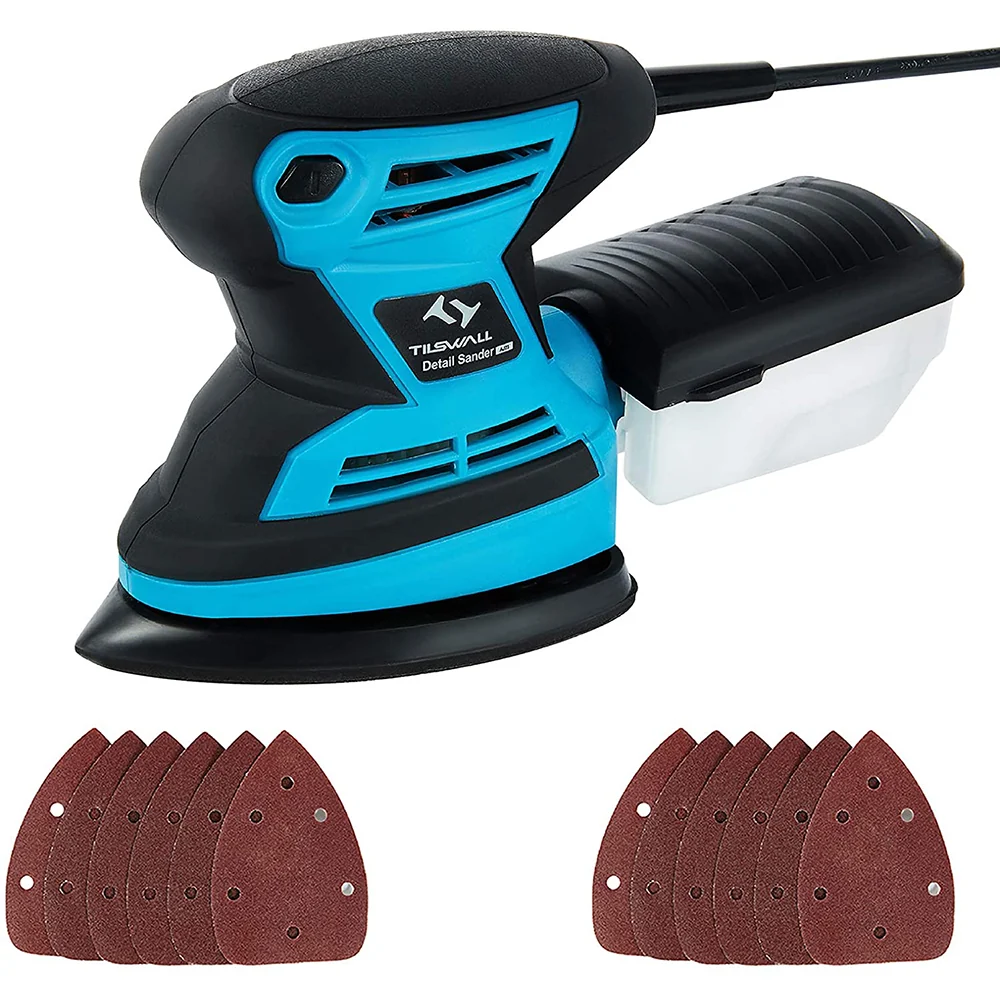
There is nothing more frustrating than settling into a project, pressing the trigger on your mouse sander, and hearing nothing but a faint hum—or worse, absolute silence. The tool that was supposed to make quick work of sanding those tight corners and intricate profiles is now a useless paperweight.
A Mouse Sander that won’t spin can bring your entire project to a grinding halt. But before you toss it in the trash or rush out to buy a new one, take a deep breath. Many of the most common problems that cause a Mouse Sander to stop spinning are surprisingly easy to fix at home with basic tools.
In this guide, we will walk through the most frequent causes of a non-spinning Mouse Sander, from simple user errors to more complex internal issues. We will provide step-by-step solutions to get your tool back up and running. And if you find yourself in the market for a new, more reliable model, we will have a recommendation for you at the end.
Safety First: Unplug Before You Diagnose
Before we start troubleshooting, let’s get one thing straight: Always unplug your corded Mouse Sander or remove the battery from your cordless Mouse Sander before attempting any repair. Sanding tools contain spinning parts and electrical components that can cause serious injury if accidentally activated. Safety is not optional—it is the first step of every repair.
Problem 1: The Motor Runs, But the Pad Doesn’t Spin
This is one of the most common complaints. You hear the motor whirring, but the triangular sanding pad remains stationary. This usually indicates a mechanical issue rather than an electrical one.
The Solution: Check the Pad Mounting Screw
Most Mouse Sanders use a small screw or bolt that holds the triangular pad onto the drive mechanism. Over time, especially with heavy use, this screw can loosen. When it does, the motor will spin its internal shaft, but the pad will not engage.
How to Fix:
- Unplug the sander.
- Turn the sander over and look at the center of the triangular pad. You should see a small screw or bolt.
- Using a Phillips head screwdriver or a hex key (depending on the model), tighten the screw firmly. Do not overtighten, as you can strip the threads.
- Reattach the pad and test the sander.
The Solution: Check the Pad Interface
Some Mouse Sanders use a plastic or metal interface between the motor shaft and the sanding pad. If this interface is cracked or stripped, the pad will not spin even if the motor is running.
How to Fix:
- Remove the sanding pad entirely.
- Inspect the plastic or metal piece that connects the pad to the tool. Look for cracks, wear, or stripped teeth.
- If the interface is damaged, you will need to replace it. Contact the manufacturer or check online for replacement parts. This is often a cheap and easy fix.
Problem 2: The Motor Runs Slowly or Not at All
If the motor itself is struggling, the problem is likely electrical. This can range from a simple power supply issue to a more serious internal fault.
The Solution: Check the Power Source
Before you assume the worst, check the basics.
- For Corded Sanders: Ensure the power cord is firmly plugged into the outlet. Try a different outlet to rule out a tripped breaker or faulty socket. Inspect the power cord for cuts, kinks, or damage. A damaged cord can cause intermittent power loss.
- For Cordless Sanders: Ensure the battery is charged. Try a different battery from the same platform to see if the issue is with the battery or the tool. Check the battery contacts on both the tool and the battery for dirt or corrosion. Clean them with a dry cloth if needed.
The Solution: Inspect the Carbon Brushes
Carbon brushes are small, rectangular blocks of carbon that transmit electricity to the motor’s rotating armature. They are designed to wear down over time. When they become too short, they lose contact, and the motor will stop spinning or run erratically.
How to Fix:
- Unplug the sander.
- Look for small plastic caps on the side or rear of the motor housing. These are the brush holders.
- Remove the caps using a screwdriver.
- Pull out the carbon brushes. They should be at least 1/4 inch long. If they are shorter than that, chipped, or unevenly worn, they need to be replaced.
- Purchase replacement brushes designed for your specific Mouse Sander model. Insert the new brushes, replace the caps, and test the tool.
The Solution: Check the Trigger Switch
The trigger switch is a common failure point. If the switch is faulty, the tool will not receive power.
How to Fix:
- Unplug the sander.
- Use a multimeter to test the switch for continuity. If you are not comfortable with electrical testing, you can try spraying a small amount of electrical contact cleaner into the switch mechanism and pressing it repeatedly. Sometimes debris or corrosion can cause a switch to stick.
- If the switch is dead, it will need to be replaced. This is a more advanced repair that may require soldering. If you are not experienced with electronics, consider taking the tool to a repair shop or replacing it.
Problem 3: The Sander Is Jammed or Won’t Move
If the motor sounds like it is trying to spin but the pad is frozen, something is physically blocking the mechanism.
The Solution: Clean the Pad and Housing
Dust and debris are the enemies of power tools. Fine sanding dust can get into the bearings, the pad interface, and the motor housing, causing the tool to seize up.
How to Fix:
- Unplug the sander.
- Remove the sanding pad and any attached sandpaper.
- Use compressed air to blow out the dust from the pad area, the vents, and the motor housing. Wear a dust mask and safety glasses.
- Use a small brush (like an old toothbrush) to dislodge stubborn debris.
- Apply a small drop of lightweight machine oil to the bearing points (if applicable) and the pad interface. Do not over-lubricate, as excess oil can attract more dust.
The Solution: Check for Physical Obstructions
Sometimes, a piece of sandpaper, a screw, or a foreign object can get lodged between the pad and the housing.
How to Fix:
- Carefully inspect the area around the pad and the housing.
- Use a pair of tweezers or a small screwdriver to remove any visible obstructions.
- Try rotating the pad by hand to see if it moves freely. If it does, the obstruction has been removed.
Problem 4: The Sander Gets Hot and Then Stops
If your Mouse Sander runs for a few minutes, gets very hot, and then shuts off, it likely has a thermal overload protection feature. This is a safety mechanism designed to prevent the motor from burning out.
The Solution: Allow the Tool to Cool Down
This is usually not a sign of a broken tool, but rather a sign of overuse or excessive pressure.
How to Fix:
- Turn off the sander and unplug it.
- Set it aside in a cool, dry place for 15-30 minutes.
- Once it has cooled down, it should reset and work again.
- Prevention: To avoid this in the future, do not press down hard on the sander. Let the tool do the work. Also, take breaks during extended sanding sessions to allow the motor to cool.
When to Give Up and Buy a New Mouse Sander
Sometimes, a repair is not worth the time, effort, or cost. Here are signs that it is time to replace your Mouse Sander:
- Burned-out motor: If the motor smells like burning electronics or will not run even with new brushes, the windings may be fried.
- Cracked housing: A cracked housing can affect the alignment of internal components and is often difficult to repair effectively.
- Stripped gears: If the internal gears are made of plastic and have stripped, replacement parts may be hard to find or more expensive than a new tool.
- Recurring problems: If you have fixed the same issue multiple times, the tool may be at the end of its life.
Prevention: How to Keep Your Mouse Sander Spinning
The best fix is prevention. Follow these tips to extend the life of your Mouse Sander:
- Clean it regularly: Use compressed air after every use to blow out dust.
- Replace sandpaper often: Clogged sandpaper forces the motor to work harder, generating excess heat.
- Don’t force it: Let the tool do the work. Excessive pressure strains the motor and bearings.
- Store it properly: Keep your sander in a dry, clean case or toolbox. Moisture can cause rust and electrical issues.
- Use a vacuum: Connecting your sander to a shop vac reduces dust buildup inside the tool.
The Reliable Alternative: Tilswall Mouse Sander
If you have tried to fix your current Mouse Sander and it is beyond repair, or if you are simply looking for a tool that is less likely to break down in the first place, consider the Tilswall Mouse Sander.
Why choose Tilswall? Because it is built with quality components that address the common failure points we discussed:
- Durable Motor: The Tilswall features a robust 2.0-amp motor that is designed for consistent performance and longevity. It handles heavy use without overheating quickly.
- Secure Pad Mounting: The triangular pad is attached with a reliable screw mechanism that stays tight during use, preventing the “motor runs, pad doesn’t spin” issue.
- Excellent Dust Management: The Tilswall includes a 3-in-1 dust collection system with a vacuum adapter. By keeping dust out of the motor housing, it significantly reduces the risk of jamming and overheating.
- Ergonomic and Lightweight: A comfortable grip means you use less force, reducing strain on both you and the tool.
- Affordable Price: The Tilswall offers professional-grade reliability at a price that makes it an easy replacement for a broken tool.
Final Thoughts
A Mouse Sander that won’t spin is a frustrating problem, but it is often solvable. From tightening a loose screw to replacing carbon brushes, many common issues can be fixed with basic tools and a little patience. Always start with the simplest solutions—check the power source, clean the tool, and inspect the pad—before diving into more complex repairs.
However, if your sander is beyond repair, or if you want to avoid frequent breakdowns, investing in a high-quality, reliable tool is the smartest move. The Tilswall Mouse Sander is a durable, well-designed tool that is built to last, with features that prevent many of the common problems we discussed. Keep your projects moving and your workshop productive by choosing a Mouse Sander you can count on.
- Managerial Effectiveness!
- Future and Predictions
- Motivatinal / Inspiring
- Fitness and Wellness
- Medical & Health
- Manufacturing
- Education
- Real-Estate
- Food Industry
- Hospitality
- Online Games
- Sports
- Home Services
- Civil Engineering
- Safety and Protection
- Software Products & Services
- Fashion and Jewellery
- Artificial Intelligence
- Entrepreneurship
- Mentoring & Guidance
- Marketing
- Networking
- HR & Recruiting
- Literature
- Shopping
- Career Management & Advancement