

 SkillClick
Why is my Hampton MacBook Pro overheating so much?
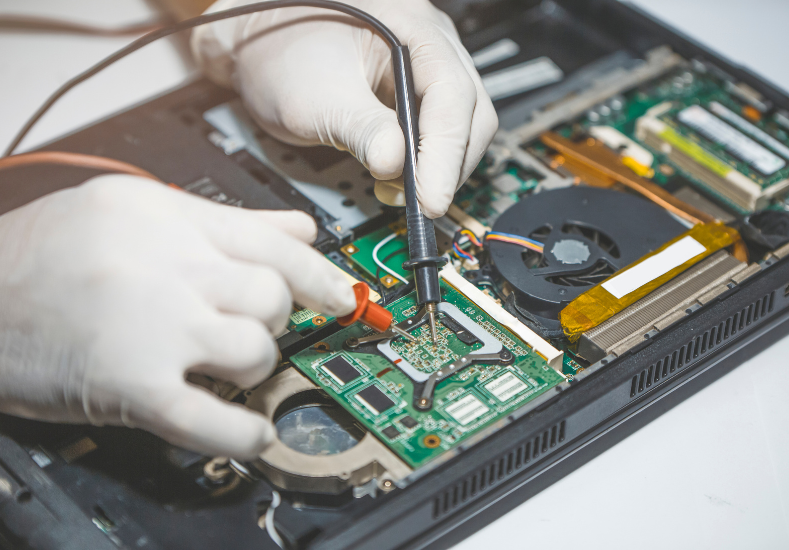
A MacBook Pro that runs warm during intensive tasks is completely normal behaviour. These are powerful machines packed into slim aluminium enclosures, and some heat generation during demanding workloads is simply part of how they operate. The problem starts when that warmth crosses into genuine overheating territory, where the base of the machine becomes too hot to comfortably rest on your lap, the fans spin up to a loud, sustained roar even during light tasks like browsing or writing documents, the machine slows down noticeably as it throttles its own performance to manage temperature, or it shuts down unexpectedly without warning. These are signs that the thermal management system is struggling to keep up, and continuing to use a MacBook Pro in that condition without addressing the underlying cause puts additional stress on components that are already running beyond their comfortable operating range.
Understanding How Your MacBook Pro Manages Heat
Before getting into what goes wrong, it helps to understand how a MacBook Pro is designed to handle heat under normal conditions. The processor and other high-output components generate heat during operation, which is drawn away from those components by a heat sink and transferred through copper heat pipes to a section of the enclosure where fans pull in cool air and exhaust the warm air out through vents, typically along the hinge area of the display. A layer of thermal paste sits between the processor and the heat sink, conducting heat efficiently between those two surfaces. macOS also plays an active role in thermal management, monitoring component temperatures through internal sensors and adjusting processor speed, known as thermal throttling, to reduce heat output when temperatures climb too high. When any part of this system degrades or becomes obstructed, the whole thermal management chain becomes less effective and overheating follows.
The Most Common Causes of Overheating in MacBook Pro Models
There are several reasons a MacBook Pro overheats, and identifying which one applies to your situation determines the right fix. Dust and debris accumulation inside the machine is one of the most frequent causes, particularly in MacBooks that are two or more years old and used in environments where dust, pet hair, or fine particles are present. Over time this debris builds up on the fan blades and clogs the internal vents, restricting airflow and causing heat to build up inside the enclosure rather than being efficiently expelled. Degraded thermal paste is another very common cause, especially in MacBook Pro models that are three or more years old, since the paste that conducts heat between the processor and heat sink dries out and loses effectiveness over time, dramatically reducing the efficiency of heat transfer. Background processes consuming excessive CPU resources, a failing or slow-running fan, and software conflicts that prevent the operating system from managing processor load correctly can all contribute to sustained overheating as well. For MacBook Pro owners experiencing persistent heat issues, accessing experienced Mac Repairs Hampton means getting a proper thermal assessment rather than guessing at which of these factors is responsible.
What Our Hampton Customers Are Saying About Same Day Mac Repairs
"My MacBook Pro had been running really hot for months and the fan was constantly running at full speed even when I was just checking emails. It was also noticeably slower than it used to be and would get uncomfortably hot on my lap within minutes of starting it up. I took it to Same Day Mac Repairs after a colleague recommended them and they identified straight away that the thermal paste had completely dried out and the internal vents were heavily clogged with dust. They cleaned everything out and replaced the thermal paste the same day. The difference was immediate and honestly remarkable. The fan is barely audible now during normal use and the machine runs cool and fast again. Wish I'd done it sooner rather than putting up with it for so long."
— Natalie F., Hampton
⭐⭐⭐⭐⭐
What Happens to Your MacBook Pro When Overheating Goes Unaddressed
Persistent overheating isn't just uncomfortable to deal with, it has real consequences for the long-term health of your MacBook Pro's internal components. Processors and GPUs are designed to operate within specific temperature ranges, and sustained operation above those ranges accelerates the degradation of solder joints, capacitors, and other components on the logic board. Thermal throttling, while it protects the processor from immediate damage by reducing its speed, also significantly impacts performance in a way that makes everyday tasks feel sluggish and frustrating. Battery health is also directly affected by sustained heat exposure, since lithium batteries degrade faster when regularly subjected to high temperatures, meaning an overheating MacBook Pro will typically see its battery life decline more rapidly than it otherwise would. In the most serious cases, prolonged overheating can cause logic board damage that results in complete hardware failure, turning what would have been a straightforward thermal service into a far more significant and expensive repair.
Simple Steps You Can Take to Reduce Overheating Right Now
While a proper thermal service is the most effective solution for persistent overheating, there are some steps you can take in the meantime to reduce heat stress on your MacBook Pro. Using the machine on a hard flat surface rather than on fabric like a bed or couch ensures the underside vents aren't obstructed, which makes a meaningful difference to airflow. Checking Activity Monitor for any runaway background processes consuming excessive CPU resources and quitting or force-quitting them can bring temperatures down quickly when software is the primary contributor. Keeping macOS and all installed applications updated ensures you have the latest performance and thermal management improvements from Apple. Avoiding charging the MacBook while simultaneously running intensive tasks reduces the combined heat load on the machine during those peak demand periods.
Conclusion: Getting Your Hampton MacBook Pro Running Cool Again
Overheating in a MacBook Pro is a problem that sits somewhere on a spectrum from a straightforward fix to a sign of deeper component stress, depending on how long it has been occurring and what's behind it. Dust accumulation and degraded thermal paste are the two most common causes and both are entirely addressable with a proper internal clean and thermal paste replacement that restores the machine's heat management to the standard it was at when it left the factory. Leaving persistent overheating unaddressed, however, shortens the lifespan of critical components and turns what is currently a manageable service into a potentially much more serious repair down the track. Same Day Mac Repairs can carry out a full thermal assessment of your MacBook Pro, identify exactly what is causing the heat issue, and perform the necessary service to get it running at the cool, quiet, and responsive standard it was designed to operate at, giving your machine a significantly extended and more reliable working life.
- Managerial Effectiveness!
- Future and Predictions
- Motivatinal / Inspiring
- Fitness and Wellness
- Medical & Health
- Manufacturing
- Education
- Real-Estate
- Food Industry
- Hospitality
- Online Games
- Sports
- Home Services
- Civil Engineering
- Safety and Protection
- Software Products & Services
- Fashion and Jewellery
- Artificial Intelligence
- Entrepreneurship
- Mentoring & Guidance
- Marketing
- Networking
- HR & Recruiting
- Literature
- Shopping
- Career Management & Advancement