

 SkillClick
How AI Photo Editing Helps Small Businesses Look Professional
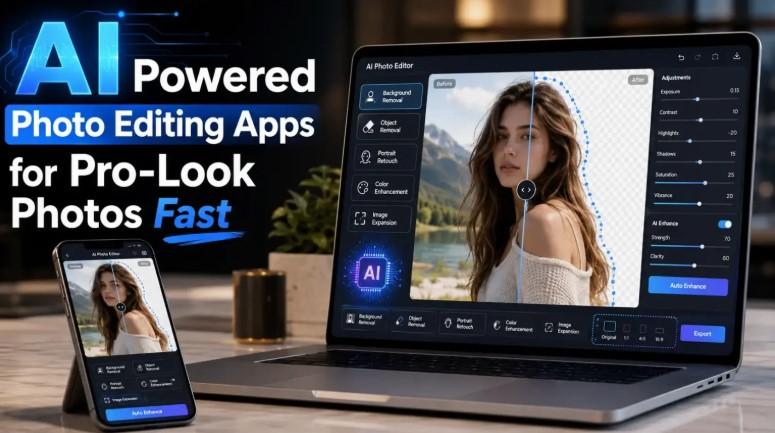
A small business can have a great product, useful service, or strong brand message, but poor visuals can make it look less professional online. In today’s digital world, people often judge a business by its photos before they read the description, check the price, or contact the seller.
This is why high-quality images matter.
The problem is that many small businesses do not have a large budget for photography, graphic design, or advanced editing software. They may use a smartphone to take product photos, profile pictures, social media images, website banners, and promotional content.
Fortunately, AI photo editing has made professional-looking images much easier to create.
With the right tools, business owners can remove messy backgrounds, improve lighting, clean up distractions, retouch portraits, sharpen product images, and prepare visuals for different online platforms. For anyone looking for practical editing options, this guide to AI powered photo editing apps is a useful resource for finding tools that can help create polished results quickly.
Why Image Quality Matters for Small Businesses
Online customers cannot touch, test, or inspect a product in person. They rely on images to understand what they are buying. If a photo is dark, blurry, messy, or poorly framed, customers may lose confidence.
Strong visuals can help a business appear:
- More trustworthy
- More professional
- More organized
- More attractive
- More reliable
- More brand-focused
This applies to many types of businesses, including online stores, local service providers, freelancers, restaurants, real estate agents, coaches, consultants, and content creators.
A clean image can make a product look more valuable. A polished profile photo can make a freelancer look more credible. A sharp social media post can make a brand look more active and modern.
What Is AI Photo Editing?
AI photo editing uses artificial intelligence to improve or change images automatically. Instead of manually editing every part of a photo, users can apply smart tools that understand the image and make quick adjustments.
AI editing tools can help with:
- Background removal
- Object removal
- Image enhancement
- Portrait retouching
- Color correction
- Sharpness improvement
- Lighting adjustment
- Image resizing
- Background replacement
- Photo cleanup
These features are useful because they save time and reduce the need for advanced editing knowledge.
1. AI Background Removal Makes Product Photos Cleaner
One of the most useful AI editing features for small businesses is background removal.
A product photo taken at home, in a shop, or on a desk may include distracting items in the background. There may be wires, furniture, shadows, clutter, or uneven lighting. These distractions can make the product look less professional.
AI background removal allows users to separate the product from the background automatically. The product can then be placed on a plain white background, a soft color background, or a branded design.
This is useful for:
- Online store listings
- Marketplace product images
- Social media shops
- Catalog photos
- Website product pages
- Promotional graphics
A clean background helps customers focus on the product instead of the surrounding clutter.
2. AI Object Removal Helps Fix Distracting Details
Sometimes a photo looks good, but one small object ruins it. It could be a stain, shadow, label, wire, unwanted person, random item, or reflection.
AI object removal tools help erase those distractions quickly. The tool analyzes the surrounding area and fills the space naturally.
For small businesses, this can be very useful. A restaurant can remove clutter from a food photo. A real estate agent can clean up a room image. A shop owner can remove distracting objects from a product shot. A freelancer can improve a workspace photo for a portfolio.
The goal is not to create misleading images. The goal is to remove unnecessary distractions so the main subject looks clearer.
3. AI Image Enhancement Improves Poor Lighting
Many small businesses take photos with smartphones. While smartphone cameras are powerful, lighting is not always perfect.
Photos may look:
- Too dark
- Too yellow
- Too dull
- Too blurry
- Too flat
- Too noisy
AI image enhancement can improve brightness, contrast, sharpness, color balance, and clarity. This makes photos look cleaner and more professional without requiring manual editing skills.
This is especially helpful for businesses that take photos indoors, in small shops, at events, or in changing lighting conditions.
A simple enhancement can make a product, person, or place look more presentable online.
4. AI Portrait Editing Supports Personal Branding
Many small business owners are also the face of their brand. Coaches, consultants, freelancers, real estate agents, fitness trainers, designers, writers, and service providers often need strong profile images.
A good profile photo can help build trust. It can be used on:
- Business websites
- LinkedIn profiles
- Portfolio pages
- Social media accounts
- Email signatures
- Online course pages
- Booking platforms
AI portrait editing can improve lighting, soften minor imperfections, sharpen facial details, and clean up the background.
The best results should look natural. Over-editing can make a photo look fake, so subtle improvements are usually better for professional use.
5. AI Editing Saves Time for Busy Business Owners
Small business owners often handle many tasks themselves. They may manage sales, customer service, marketing, packaging, posting, and website updates.
Spending hours editing photos is not always realistic.
AI photo editing helps save time by turning complex edits into quick actions. A business owner can prepare images faster for:
- New product launches
- Social media updates
- Seasonal promotions
- Website changes
- Online ads
- Blog posts
- Email campaigns
- Marketplace listings
Instead of waiting for a designer or learning complicated software, they can make quick improvements and publish content faster.
6. AI Tools Help Create Consistent Brand Visuals
Consistency is important for branding. When all images look different, a business page can feel messy. When images have a similar style, the brand looks more organized.
AI editing tools can help create consistency by making it easier to use similar backgrounds, lighting, cropping, and image quality.
For example, an online seller can use the same type of background for all product photos. A consultant can use a clean and polished style for profile images. A restaurant can brighten food photos in a similar way before posting them.
Consistent visuals help customers recognize the brand more easily.
7. AI Photo Editing Is Useful for Social Media Marketing
Social media platforms are highly visual. A business may post useful information, but if the image does not catch attention, many users will scroll past it.
AI photo editing can help make social media posts more attractive by improving the photo before adding captions, text, or design elements.
Businesses can use AI-edited images for:
- Instagram posts
- Facebook updates
- Pinterest pins
- LinkedIn posts
- TikTok covers
- YouTube thumbnails
- Story graphics
- Promotional banners
A brighter and cleaner image can make the final post look more professional.
8. AI Editing Can Reduce Marketing Costs
Hiring professional photographers and designers is valuable, but not every business can afford it for every image. AI photo editing gives small businesses a more affordable option for everyday content.
This does not mean professionals are no longer needed. For major campaigns, brand shoots, and advanced creative work, professional services are still important.
However, for daily product photos, social media posts, simple banners, and website updates, AI tools can reduce costs and improve speed.
This is especially helpful for startups, solo entrepreneurs, and home-based businesses.
9. AI Editing Helps Turn Smartphone Photos Into Useful Content
Many business owners already have a powerful camera in their pocket. The challenge is turning smartphone photos into content that looks polished enough for online use.
AI editing bridges that gap.
A basic smartphone photo can be improved by:
- Cropping it properly
- Removing the background
- Adjusting the lighting
- Enhancing the subject
- Cleaning unwanted objects
- Resizing it for platforms
- Adding a professional finish
This makes it easier for small businesses to create content regularly without needing a studio setup.
10. AI Photo Editing Supports Faster Content Publishing
Speed matters in online marketing. Businesses often need to post quickly about new products, limited offers, events, seasonal promotions, or customer updates.
AI photo editing helps businesses prepare visual content faster. They can take a photo, improve it, and publish it without a long editing process.
This is useful for:
- Flash sales
- New arrivals
- Restaurant specials
- Event announcements
- Service updates
- Behind-the-scenes posts
- Customer testimonials
- Portfolio updates
Faster editing means businesses can stay active and relevant online.
Tips for Better AI-Edited Business Photos
AI tools are helpful, but good results still depend on smart editing choices. Here are some simple tips.
Start With Good Lighting
AI can improve lighting, but it works better when the original photo is clear. Natural light is often the easiest option for product and profile photos.
Keep the Main Subject Clear
Make sure the product, person, or object is easy to see. Avoid taking photos where the subject blends into the background.
Use Simple Backgrounds
A clean background makes editing easier and gives the final image a more professional look.
Avoid Heavy Filters
Strong filters can make business photos look unrealistic. Use natural colors and balanced lighting instead.
Check the Edges
After using background removal, zoom in and check the edges of the product, hair, hands, or object. Clean edges make the image look more professional.
Export in High Quality
Low-quality exports can look blurry on websites and social platforms. Always save images in the right size and resolution.
Common Mistakes to Avoid
AI photo editing is easy, but it can still be misused. Avoid these mistakes:
- Over-smoothing portraits
- Using unrealistic backgrounds
- Making product colors inaccurate
- Removing important product details
- Over-sharpening images
- Ignoring platform size requirements
- Publishing without checking AI errors
For business use, accuracy is important. Product photos should look attractive, but they should still represent the real product honestly.
Final Thoughts
AI photo editing is becoming an important tool for small businesses, freelancers, and online sellers. It helps improve image quality, remove distractions, create cleaner backgrounds, and make everyday smartphone photos look more professional.
The biggest advantage is accessibility. Business owners no longer need advanced design skills to create better visuals for websites, social media, product listings, and personal branding.
With the right AI photo editing tools, small businesses can save time, reduce costs, and build a stronger online presence. Clean and professional images can help attract attention, build trust, and make a brand look more reliable.
In a competitive online market, better visuals are not just nice to have. They can make a real difference in how customers see a business.
FAQ
How does AI photo editing help small businesses?
AI photo editing helps small businesses improve product photos, clean backgrounds, remove distractions, enhance lighting, and create professional-looking images faster.
Can AI editing improve product photos?
Yes. AI tools can remove backgrounds, brighten images, sharpen details, and make product photos look cleaner for online stores and social media.
Is AI photo editing good for personal branding?
Yes. AI portrait tools can help improve profile photos, clean up backgrounds, and make personal branding images look more polished.
Do small businesses need professional design skills to use AI photo editors?
No. Most AI photo editing tools are designed to be beginner-friendly and easy to use.
Should business photos be heavily edited?
No. Business photos should look clean and professional, but they should still appear natural and accurate.
- Managerial Effectiveness!
- Future and Predictions
- Motivatinal / Inspiring
- Fitness and Wellness
- Medical & Health
- Manufacturing
- EĞİTİM BİLGİLERİ
- Real-Estate
- Food Industry
- Hospitality
- Online Games
- Sports
- Home Services
- Civil Engineering
- Safety and Protection
- Software Products & Services
- Fashion and Jewellery
- Artificial Intelligence
- Entrepreneurship
- Mentoring & Guidance
- Marketing
- Networking
- HR & Recruiting
- Literature
- Shopping
- Career Management & Advancement