

 SkillClick
Professional Logo Conversion for Pfaff Embroidery Machines Explained
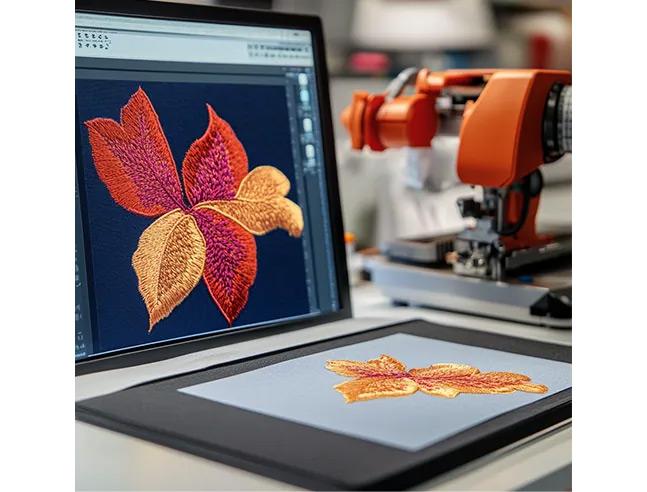
You have a Pfaff embroidery machine—a benchmark for precision and innovation in the sewing world. You also have a logo, ready to become a stitched emblem on a bag, hat, or uniform. But loading that PNG file directly will only lead to frustration. Your Pfaff speaks a specific digital language, and your logo needs to learn it. This process of translation is what professionals call digitizing, and understanding how to Convert Logo for Pfaff Embroidery Machines is the critical first step to achieving results worthy of your machine's reputation. This guide will walk you through the professional workflow, from preparing your artwork to generating the perfect file that makes your Pfaff perform at its best.
It’s Not a Conversion, It’s a Translation
First, let's clarify the most important concept. You are not simply changing a file extension. You are translating a static, visual graphic into a dynamic set of instructions. Your logo is a picture; an embroidery file is a recipe.
A professional digitizer acts as the translator. They analyze your 2D logo and write a 3D blueprint that tells your Pfaff machine:
-
Where to move the needle (coordinates).
-
What type of stitch to use and at what angle.
-
When to change thread color.
-
How to build a foundation (underlay) to prevent puckering.
This blueprint must account for the physics of thread tension and the behavior of your specific fabric. A simple "auto-convert" online tool ignores all of this, guaranteeing poor results.
Step 1: Preparing Your Logo – The Foundation of Quality
Professional results start with professional source material. This step is non-negotiable.
1. Provide a Vector File (If Possible):
This is the gold standard. Formats like .AI (Adobe Illustrator), .EPS, or .PDF contain clean, scalable paths—not pixels. This gives the digitizer perfect lines to work from, ensuring crisp edges and easy scaling. If you have this, you’ve won half the battle.
2. If You Only Have a Raster Image (JPG, PNG):
Don't panic, but manage your expectations.
-
Use the Highest Resolution Possible: A tiny, 72-DPI logo from your website will become a blurry, pixelated mess. Send the original, largest file you have.
-
Ensure Clarity and Contrast: A simple, bold logo with clear edges digitizes far better than a detailed photograph or a logo with subtle watercolor effects.
3. Communicate the Context:
Before any digitizing begins, a professional will ask:
-
What are you sewing this on? (e.g., a cotton polo, a nylon cap, a thick towel)
-
What is the finished size? (e.g., 3 inches wide on the left chest)
-
Are there any specific thread brand colors? (e.g., Pantone 185 C for red).
This context dictates every technical decision in the digitizing process.
Step 2: The Professional Digitizing Process
This is where the craft happens. Using specialized software, a digitizer manually interprets your logo.
Key Decisions They Make:
-
Stitch Type Assignment:
-
Fill Stitches: Used for solid background areas. The digitizer sets the density (stitches per inch) based on your fabric.
-
Satin (Column) Stitches: Used for borders, text, and fine lines. They control the width and sheen.
-
Running Stitches: Used for very fine details or outlining.
-
-
Applying Embroidery Engineering:
-
Underlay: This is the hidden foundation. It stabilizes the fabric, prevents puckering, and makes the top stitches look raised and professional. Skipping this is the #1 cause of amateur-looking embroidery.
-
Pull Compensation: Fabric pulls under the tension of stitches. The digitizer slightly widens shapes so they sew out to their correct visual size.
-
Stitch Sequencing: They plan the optimal order to sew different sections, minimizing thread trims and machine jumps for a clean, efficient sew-out.
-
Step 3: Understanding Pfaff-Specific File Formats
Now, let's talk about the language your Pfaff machine understands. The most common format for modern Pfaff embroidery machines is .PES. However, depending on your specific model and software, you might also use:
-
.PES: The primary format for most Pfaff HOME embroidery machines (like the Creative™ series).
-
.PXF: A common format for Pfaff and Viking software. This is often a project file that can contain editable information, not just final stitch data. It’s useful if you plan to edit the design within Pfaff software later.
-
.VP3: Another format native to the Pfaff/Viking/Husqvarna ecosystem.
Your Action: Check your machine manual or look up your specific model online to confirm its native format. When in doubt, .PES is a very safe bet for home/hobbyist models. A professional digitizing service will always provide you with the correct format for your machine.
Step 4: The Critical Test Sew
No professional job is complete without verification. Before delivering the final file, a reputable service will either:
-
Run a Physical Test Sew: They stitch the design on a scrap of fabric similar to your target material. This is the only way to catch physical issues like puckering or misregistration.
-
Provide a Detailed Simulation: They send a realistic, stitch-by-stitch animation of the design being sewn, allowing you to approve the sew path and look.
You should always do your own test sew on scrap fabric with your stabilizer before stitching the final garment. This final check ensures everything is perfect for your specific setup.
Why Professional Services Outshine DIY & Auto-Converters
It’s tempting to look for a quick, cheap fix. Here’s why that fails:
-
Auto-Converting Websites: These algorithmic tools have no understanding of fabric, tension, or underlay. They create dense, inefficient stitch files that often cause puckering, thread breaks, and look unprofessional. They are not "digitizing"; they are just filling shapes.
-
The DIY Learning Curve: Professional digitizing software is powerful but complex. Mastering it to produce reliable, high-quality files takes significant time and practice. For a one-off logo or occasional projects, the investment in software and learning is rarely worth it compared to the modest fee of a professional service.
A professional service delivers a file engineered for success on the first try, saving you time, money, and frustration from wasted materials.
How to Choose and Work with a Digitizing Service
-
Find a Specialized Service: Look for providers who explicitly mention embroidery digitizing, not just generic "file conversion."
-
Provide Clear Information: When you order, specify: (1) Your machine brand (Pfaff), (2) Your likely file format (.PES), (3) Your target garment and size, (4) Your high-resolution logo file.
-
Ask About Revisions: A good service will offer minor adjustments to ensure the file sews perfectly for you.
-
Expect a Fair Turnaround: Professional digitizing is not instant. A 24-48 hour turnaround for a quality file is standard and worth the wait.
Conclusion: Unlock Your Pfaff's Potential with the Right File
Learning how to Convert Logo for Pfaff Embroidery Machines is ultimately about respecting the craft. Your Pfaff is a precision instrument capable of stunning work, but it can only execute the instructions it’s given. By investing in professional digitizing—starting with quality artwork and ending with a tested, machine-specific file—you provide it with a blueprint for excellence.
This process ensures your logo is not just stitched, but is engineered to be durable, clean, and visually striking. It transforms your branded apparel from a simple commodity into a professional representation of your attention to detail. Don't let a poor-quality file be the weak link. Partner with a professional digitizer, and watch your Pfaff truly bring your logo to life, one perfect stitch at a time.
- Managerial Effectiveness!
- Future and Predictions
- Motivatinal / Inspiring
- Fitness and Wellness
- Medical & Health
- Manufacturing
- Education
- Real-Estate
- Food Industry
- Hospitality
- Online Games
- Sports
- Home Services
- Civil Engineering
- Safety and Protection
- Software Products & Services
- Fashion and Jewellery
- Artificial Intelligence
- Entrepreneurship
- Mentoring & Guidance
- Marketing
- Networking
- HR & Recruiting
- Literature
- Shopping
- Career Management & Advancement